Navigating Signing up to Speak for Council Meetings

1.

To locate a meeting agenda, including the Speaker Card links, scroll to the bottom of the page and locate the City Council links within the footer of the site:

footer screen shot

Select City Council Meeting and Work Session Agenda. This will bring you to a new page with a listing of current years meetings.

2.

The new page displays search options for locating all City department meetings. a) No records may display until you select the appropriate search criteria. b) In the Search Calendar options, use the drop-down arrows if you wish to select a year other than the year or years listed and All Departments to view all scheduled City Council and Work Session meetings. This list will populate with additional meetings as they are scheduled. You can narrow your search by changing the search criteria to view only the types of meetings you want to see for a specific date range.

a)default screen of Insights

b)search calendar events for Insight


3.

 To open the meeting agenda, click the Agenda pdf link for the meeting you want to view:
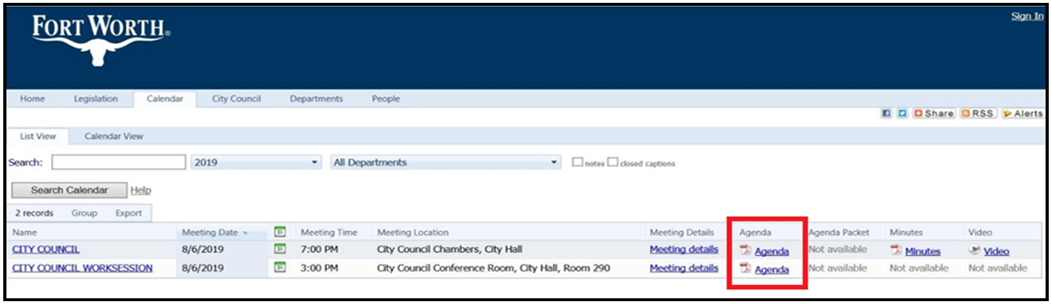
meeting agenda document how to open on Insight


When the agenda document for that meeting opens:

1. Once the agenda document displays, scroll through the items to locate the Speaker/Comment Card link. 
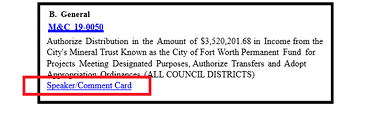
Speaker Card Instructions

2. Click the Speaker/Comment Card link and follow the instructions to fill out the card.


If you are having issues with the speaker card links or would like assistance contact the City Secretary's Office at 817-392-6150.